Free · Open source · Native macOS

Your Claude Code limits, right in the menu bar.

A native macOS menu-bar app that surfaces your Claude Code usage at a glance — no terminal, no telemetry. Real data, straight from Anthropic.

Download for macOS How to install

Apple Silicon · macOS 14+ · signed & notarized · ~1.3 MB · free

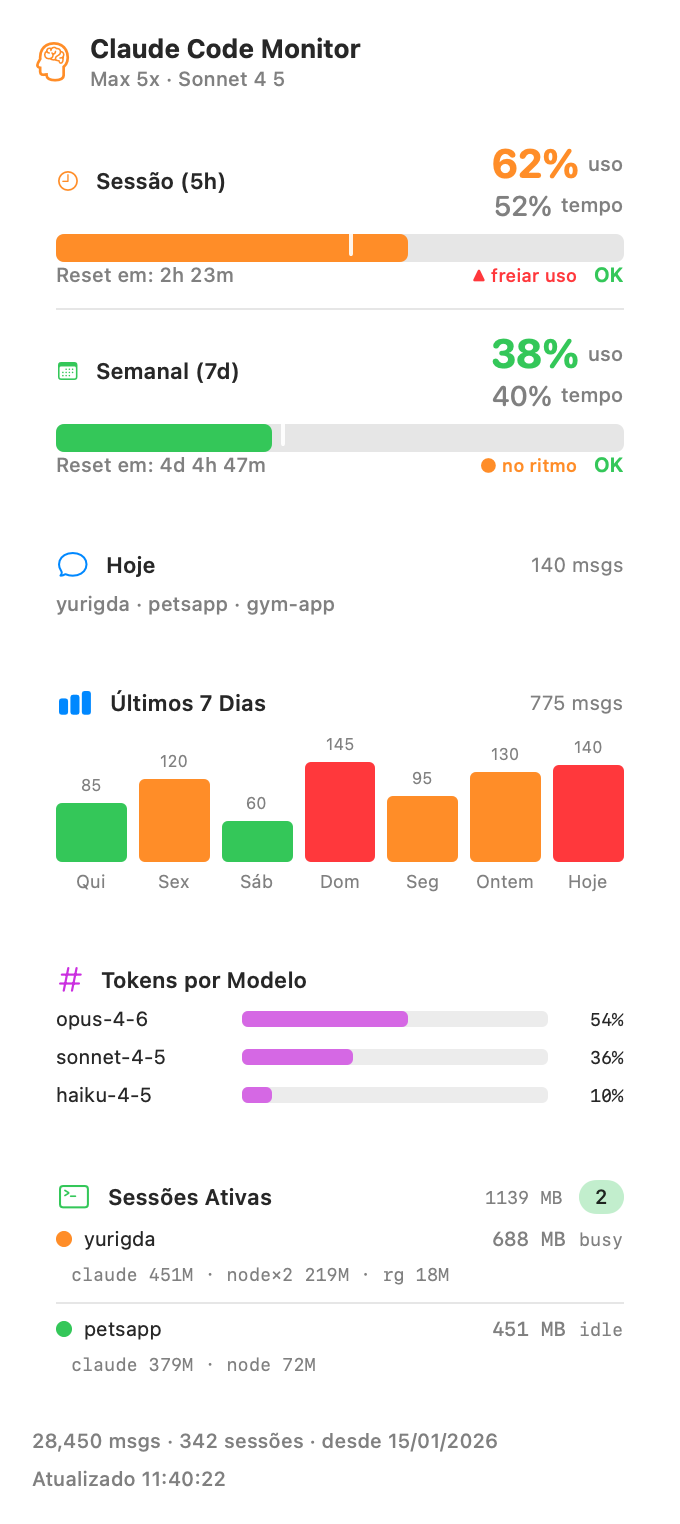
Claude Monitor popover showing 5h and weekly usage, daily activity and active sessions
Everything at a glance

Your whole Claude Code picture, in one popover

⏱️

5-hour session

Percent of the rolling 5-hour window used, with a time-vs-usage pace marker and a countdown to reset.

📅

Weekly (7-day)

The same for the rolling 7-day window — pace marker and reset countdown, so you never get surprised.

💬

Today

Message count for the day and the list of projects you actually touched.

📊

7-day chart

Messages per day as a bar chart, colored green / orange / red relative to your weekly average.

#️⃣

Tokens by model

A clean breakdown of your token usage across Opus, Sonnet and Haiku.

🖥️

Active sessions

Every running Claude Code session with its status (busy / idle) and per-session memory.

Under the hood

Real data. Your own login. Nothing leaves your Mac.

01

Straight from Anthropic

Every 5 minutes it makes one tiny 1-token Haiku call and reads the official anthropic-ratelimit-* response headers. These limits are unified across your whole account.

02

Uses your existing auth

It reads the OAuth token that Claude Code already stores in your macOS Keychain. Nothing to paste, nothing to configure — Claude Code keeps it refreshed.

03

100% local & private

Reads only your local ~/.claude files for today's activity, the chart and sessions. No telemetry, no analytics, no third parties.

🔒

Honest note. Claude Monitor needs an active Claude Code / Anthropic login on your machine — it does nothing without one. The periodic 1-token call has a tiny but non-zero cost (a few input tokens every 5 minutes). That's the only network call it ever makes.

Get started in 30 seconds

Download, drag, done

Download the .dmg

Grab the latest signed & notarized build. Apple Silicon, macOS 14 or newer.

Drag to Applications

Open the disk image and drag Claude Monitor onto the Applications folder.

Launch it

Double-click to open. It lives in your menu bar — click the glyph to see everything.

Download Claude Monitor

Prefer to build from source? Clone the repo and run ./build.sh.